A hundred videos sounds like a useful way to describe a library. It is a poor way to buy storage. A collection of short product clips and a collection of recorded workshops can have the same number of files and very different space requirements.
You do not need a complicated forecast. A simple inventory will tell you what fits today, what your next upload batch needs, and whether replacing a few large videos could push you over the limit.
Which files should you count?
Count the final video files that will actually live on the hosting service. Keep camera originals, editing projects and alternative exports out of the total unless you also intend to upload them.
Put those delivery files in a dedicated folder or list their sizes in a spreadsheet. Include every language version or separate edit that needs its own hosted upload. If you have a trailer and a full length video, those are two files, even when they belong to the same project.
Keep a separate backup of your originals. A hosting allowance is a delivery decision, not a reason to delete the only copy of your work. Before removing an older upload, check whether any live page still embeds it.
How do you find the size of your video library?
Use the actual file sizes from your computer, rather than guessing from resolution or duration. On a Mac, select a file and choose File, then Get Info. Apple's guide to viewing file information explains the same route.
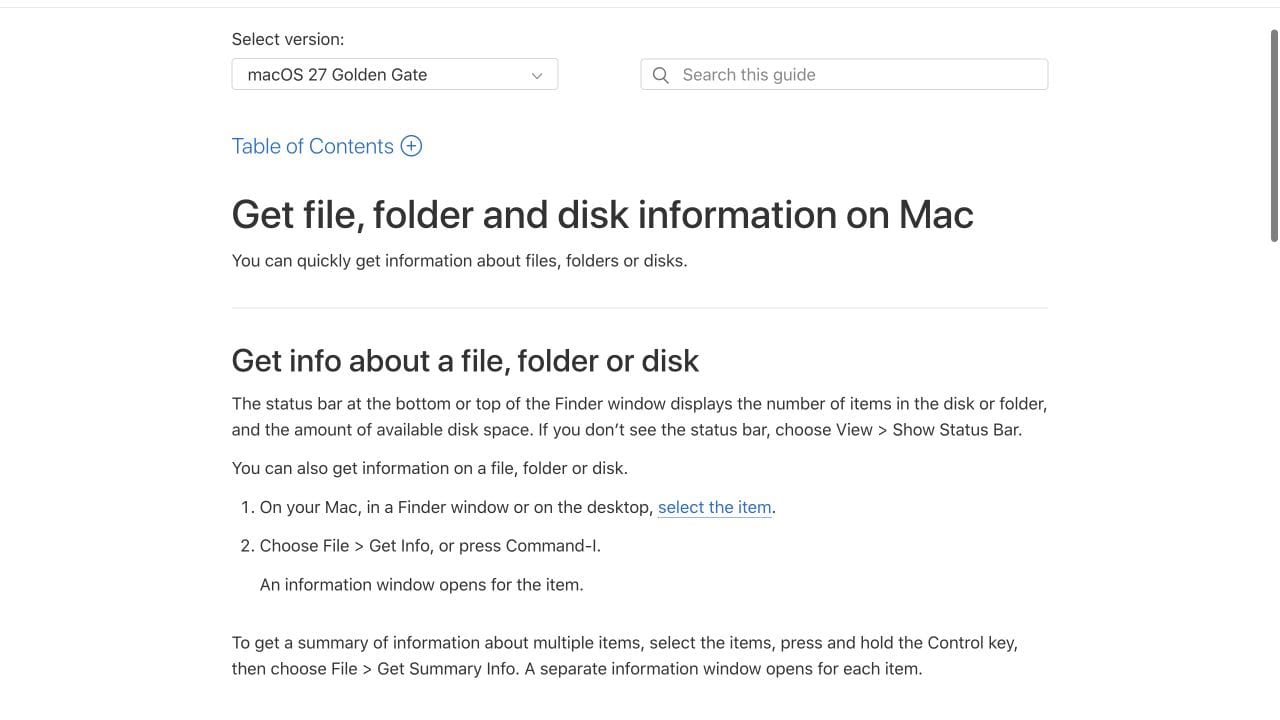
For a mixed folder, make sure the total does not also include cover artwork, source footage or old exports that you will not upload. Where exact byte counts are available, add them together and divide by 1,000,000,000 to express the result in decimal GB. This worksheet uses 1 GB = 1,000 MB.
If you only have a sample, group similar videos together before estimating the rest. Measuring one short clip and multiplying by 100 can miss the handful of long recordings that take most of the space. Mark estimated rows so you can replace them with real sizes later.
What does a mixed library of 100 videos look like?
This hypothetical library needs 16.8 GB for its current delivery files. The figures below are a worked example, not measurements of a customer's library or a Vidreno encoding test.
| Video group | Files | Average file size | Total storage |
|---|---|---|---|
| Short product clips | 60 | 40 MB | 2.4 GB |
| Product demonstrations | 30 | 180 MB | 5.4 GB |
| Long recordings | 10 | 900 MB | 9 GB |
| Total | 100 | Mixed | 16.8 GB |
The ten long recordings use more than half the space. That is why grouping files is more useful than a promise that a plan holds a particular number of videos. Your own average could be much smaller or much larger.
In a spreadsheet, put the group name in column A, the file count in B, average MB in C and total GB in D. For the first data row, enter =B2*C2/1000 in D2, copy it down, then sum column D. Once you have every file, use the exact total instead of a sample average.
How much room should you leave for growth and replacements?
Add the uploads you expect before your next review and any old and new files that must coexist during a replacement. There is no single spare percentage that suits every library.
Suppose the example library will gain 20 demonstrations at 180 MB each. That adds 3.6 GB. Suppose three 900 MB recordings will also be replaced, and you need both versions online while checking and changing the embeds. That temporarily adds another 2.7 GB.
| Storage requirement | Calculation | GB |
|---|---|---|
| Current library | 100 existing files | 16.8 |
| Planned new uploads | 20 × 180 MB | 3.6 |
| Temporary replacement copies | 3 × 900 MB | 2.7 |
| Expected peak | Current + new + temporary | 23.1 |
If those sizes are still estimates, an optional 10% planning margin would bring this example to 25.41 GB. That is an allowance for uncertainty in this example, not a claim that hosting always adds 10% overhead. Replace it with a margin that reflects your actual upload plans.
Will the hosting service count the same amount?
Not necessarily. Your file inventory measures what you upload; the provider's storage policy determines what consumes the allowance. Check whether the quota counts original files, processed versions, or video duration.
For example, Cloudflare Stream's storage documentation measures stored video in minutes rather than file size and says its generated quality levels do not add to that stored duration. A GB worksheet cannot be converted directly into a plan sold by stored minutes. You also need the total running time.
The video below, from Wowza, explains adaptive bitrate streaming and why one video can have several quality versions. It is useful background for the question to ask your host. It does not establish how Vidreno accounts for those versions.
Watch Wowza's explanation of adaptive bitrate streaming if the embedded video does not load.
Before moving the whole library, upload a small representative batch and compare the account's reported usage with the file inventory. Ask the provider to explain any difference. Do not assume that a processed copy is either free or counted twice without checking the policy.
How should you use this worksheet when choosing Vidreno Hosting?
Compare your expected peak with a storage allowance, then check delivery separately. Vidreno Hosting is for videos embedded in your own website or app. Vidreno On Demand is the separate service for public film purchases and rentals.
On 8 October 2026, Vidreno's current Hosting pricing page lists 20 MB of storage and 50 GB of monthly bandwidth on Free. Standard lists 10 GB of storage and 5 TB of monthly bandwidth for $12 per month. Free is useful for trying a small video and its presentation on your site; it is not a promise that a whole library fits.
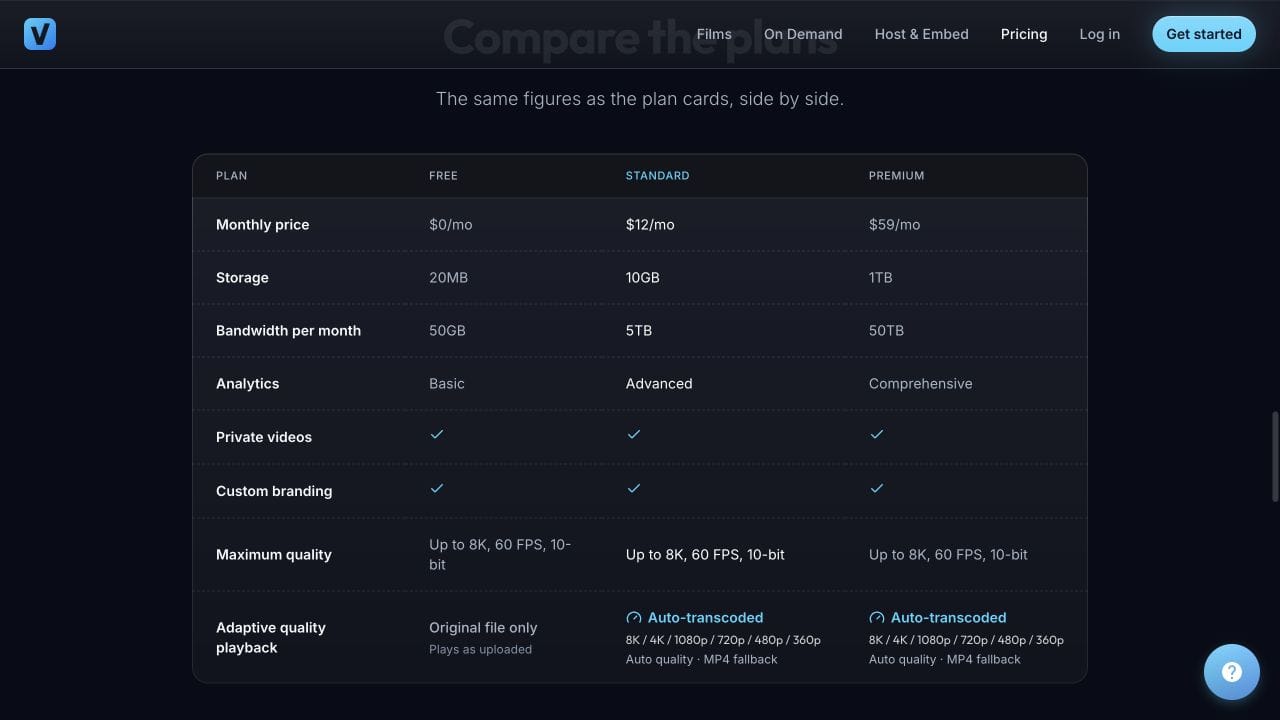
The 16.8 GB example already exceeds Standard's 10 GB, before adding new uploads. That library needs more space or fewer hosted files. Do not squeeze the forecast into a smaller plan by ignoring replacements or counting only the first batch.
You can try the Vidreno player with a file that fits Free and change its colours to suit your website. For a larger library, use your inventory to choose a suitable current plan and confirm how processed video affects the storage quota.
Storage is only one part of the decision. Repeated viewing consumes delivery bandwidth, even when the stored library stays the same. Use our video bandwidth worksheet for that separate forecast. If your delivery files are unnecessarily large, our guide to reducing video delivery costs without spoiling quality covers the optimisation decision.
Questions worth checking before you upload
Do 100 videos at 1080p always need the same storage?
No. Resolution alone does not determine file size. Duration, encoding settings, audio and the material being encoded also matter. Use measured sizes for the exports you will upload.
Why can GB and GiB show different totals?
They use different units. A decimal GB is 1,000,000,000 bytes; a GiB is 1,073,741,824 bytes. Compare byte counts or convert both totals to the same unit before deciding that space has disappeared.
Does embedding the same hosted video on ten pages need ten copies?
Reusing the same hosted asset does not require ten separate uploads. Ten independently uploaded copies are a different inventory. Viewing from those pages can still increase delivery usage.
Should thumbnails and caption files go in the worksheet?
Include them if the service counts those assets towards the same storage allowance. Keep them as a separate row so the video total remains clear, and verify the provider's policy before assuming an exemption.
Can I remove the original after uploading?
Keep an independent backup of any original you need to preserve. Playback access is not evidence that your host offers an equivalent original download or a complete backup service.
How often should I update the estimate?
Update it before a substantial new batch, a replacement project or a plan change. For an actively growing library, a regular review also makes it easier to spot unused duplicates before they become a capacity problem.
Start with a small upload, check the player on your own page, then size the plan around the library you actually intend to maintain.