You have brought someone to a product page. They press play to see how something works. The last thing you want is another company's advert appearing before your own explanation.
The important choice happens before you paste the code. You need to know who controls the player, what that provider is allowed to show, and whether your website builder will preserve the embed. This guide covers those decisions and shows the Vidreno player you can use on your own website.
What does a video without ads actually mean?
It means the player does not insert advertising before, during or after the video. That is separate from a provider logo, a suggested video, a link to another site or a tracking request.
| What you want to remove | What to check |
|---|---|
| Advertising around playback | The host's advertising policy for the specific plan |
| A provider logo or link | Branding options and what remains clickable |
| Suggested videos afterwards | The player's actual end screen and supported controls |
| Unwanted visitor tracking | The provider's data practices and your consent requirements |
Write down which of these matters on your page. A player can meet one requirement while missing another. For a product demonstration, the priority may be uninterrupted playback and keeping the visitor near the purchase button. A private training page has additional access requirements.
Can an embed setting turn off YouTube advertising?
You should not treat a YouTube privacy setting as a promise of playback without ads. YouTube's official embedding guidance says that ads served through its privacy enhanced player will be non personalised. That mode changes aspects of personalisation; it does not promise that no ad will appear.
Similarly, an embed loads the provider's player inside your page. Moving it into an iframe does not transfer control of its advertising policy to you. If a page must never show inserted advertising, choose the hosting arrangement on that basis rather than relying on a parameter suggested in an old tutorial.
Which embedding method should you use?
Use the video host's generated iframe when you want its managed player, or an HTML video element when you are deliberately managing the media files and playback yourself. A normal viewing page link is not always interchangeable with either.
The MDN iframe reference describes an iframe as a separate browsing context embedded in the current document. In practice, your page holds the player, while the video service supplies what runs inside it.
That is convenient when you want the provider's controls and delivery system. With a direct video file, you take more responsibility for formats, captions, delivery and the experience across devices. Neither method automatically makes a service private or free of advertising.
- Choose a host and confirm its advertising and branding rules.
- Upload a file you have permission to publish and wait until it is ready.
- Copy the supported embed code for that video.
- Paste it into a trusted HTML or embed component in your website.
- Preview and check the published page as a visitor.
Your website builder may restrict custom HTML on some plans or remove unsupported attributes. If the code appears as text, you have probably pasted it into a text component. If the player disappears after saving, inspect the saved page before repeatedly changing the video URL.
What does a real Vidreno embed look like?
The player below uses the public demonstration video from Vidreno's Hosting page. It is an actual embed, so you can try playback here rather than judge the player from a picture alone.
Explore Vidreno Hosting for your website or app. The demonstration uses its original settings, including fullscreen being off. Your own video uses the embed code generated for your chosen settings.
The demo played its own footage without an inserted advert during this check. That observation is limited to this demonstration, not a test of every account or future policy. You can assess the clean presentation yourself and use a small upload to check your own page.
Vidreno supports changing player colours to suit your website. That helps the controls feel part of your design. Colour changes are a branding choice, not an advertising switch, and you should keep enough contrast for visitors to see the controls.
What should you keep in the embed code?
Keep the real video URL and the permissions required by the features you intend to use. Give the iframe a descriptive title and let the visitor start playback unless the page has a clear reason to behave differently.
For your own video, start from the host's generated code rather than guessing an identifier. The demo above belongs to Vidreno; copying its URL will play that same demonstration, not your upload. An iframe title such as “How the folding mechanism works” is more useful than “video”.
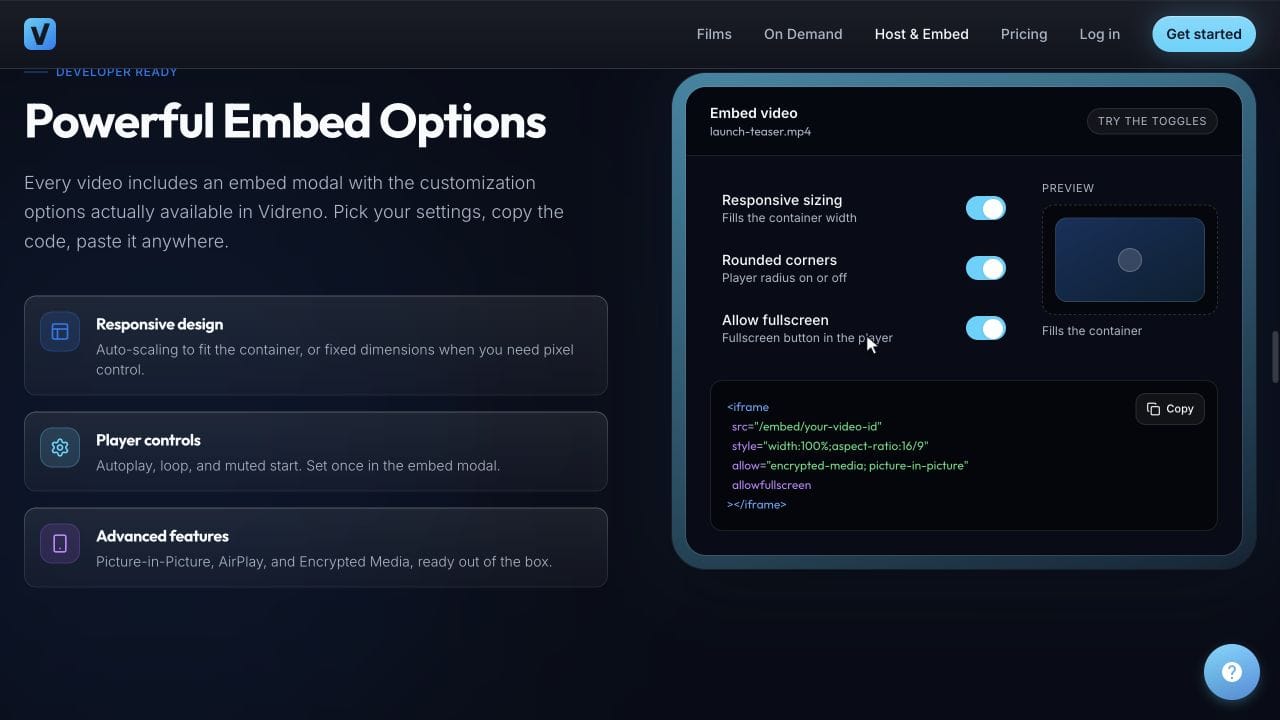
Choose the player size for the space in your page and check it on a phone. Avoid removing visible controls just to make the picture look cleaner. A viewer still needs an obvious way to pause, adjust sound and understand what is happening.
For Vidreno's account specific steps, use the separate embedding documentation. If automatic playback is the problem, our autoplay troubleshooting guide covers that question in detail.
How do you check the page before sending visitors to it?
Check the published page from start to finish, including the end screen. An editor preview alone may not show the same result that a visitor receives.
| Check | What a useful result looks like |
|---|---|
| Start playback | The intended video starts and the controls are usable |
| Pause and seek | The visitor can control the viewing without leaving your page |
| Finish the video | The end screen fits the experience you promised |
| Use a phone | The player fits the page and its controls remain reachable |
| Visit while signed out | Your intended audience can watch without your account session |
Also check captions when your content needs them and keep useful surrounding text available if the player cannot load. For unexpected stalls, follow our guide to diagnosing an embedded video that buffers.
Can you start with free video hosting?
Yes, if the file and expected viewing fit the allowance. On 9 October 2026, Vidreno's Hosting plans list 20 MB of storage and 50 GB of monthly bandwidth on Free. Standard is $12 per month with 10 GB of storage and 5 TB of monthly bandwidth.
Free can be enough to try a small clip on your site. It is not unlimited storage, and the current Hosting page explains that Free plays the original uploaded file while paid plans include adaptive quality playback. Use the plan that fits your content and delivery needs, rather than assuming that every file behaves identically on every plan.
This is Vidreno Hosting for videos inside your website or app. Vidreno On Demand is the separate public film service. For the broader buying decision, see our affordable video hosting comparison.
Frequently asked questions
Can a cookie banner prevent the video from loading?
Yes, if your site holds back external players until a visitor makes a consent choice. Test both states and provide a clear explanation when the player is unavailable. Do not mistake intentional blocking for a broken video URL.
Can my website's CSS remove an advert inside the player?
Do not rely on it. A player loaded from another origin is separate from your page, and hiding part of a player is not a supported replacement for choosing the right service.
Will my page still work if the video host is unavailable?
The surrounding page can remain available even if the external player fails. Keep the essential explanation and next step in your page text so a visitor is not left with an empty box and no useful information.
Do I need a public channel to embed my own video?
Not necessarily. A dedicated hosting service can deliver a video inside your website without making a public channel your destination. Check the host's sharing and access rules separately.
Is an embed automatically protected from copying?
No. Putting a player on a page does not by itself create access control or prevent copying. Treat confidentiality and paid access as separate requirements.
Does changing hosts require replacing every page?
You normally need to update wherever the old video URL or embed is stored. If several pages share one component, update and check that component; otherwise maintain an inventory of the individual placements.
Start with a small video in Vidreno Hosting, choose player colours that suit your site and use your video’s embed code on your page. Your visitors can watch where your content already lives, with your next step close to the player.