
A video taking off should be good news. The uncomfortable part is seeing traffic climb without knowing whether you have two days of delivery left or two hours.
This guide is a response plan for that moment. It covers videos hosted on websites and apps, rather than public film purchases and rentals. If you are still estimating a normal month's needs, start with our video bandwidth planning guide. Here, we will turn a usage reading into a decision you can act on today.
Start with a timestamp, not a view counter
Open the account responsible for video delivery and record four things: the billing period, the latest usage total, the time that total covers and the allowance or spending budget left. Page views and social impressions are useful context, but they are not a substitute for the provider's billing measure.
Keep your units consistent. A plan measured in gigabytes needs a transfer reading. A service billed by delivered minutes needs a minutes reading. Check whether the report covers one video, all videos or the whole account. A quiet second site can still use the same allowance.
If you do not know which service supplies the video, our guide to embedded video and website bandwidth explains how to find the delivery route. Do that once, then keep the correct account link beside your response notes.
Estimate how much time you have left
For a short response window, two recent usage readings are more useful than last month's average. Subtract the earlier total from the later total, then divide by the elapsed hours. This gives you a recent delivery rate. It is a rough planning rate, not a promise that traffic will stay level.
Imagine a hypothetical account with 1,200GB remaining. Its usage rises by 120GB between two readings covering two hours. That is 60GB an hour, giving roughly 20 hours until the allowance is used if the rate stays unchanged. If the rate doubles, that estimate becomes 10 hours.
Now allow time to respond. Suppose you need six hours to approve and complete a change, and allow another two hours for reporting delay. At 60GB an hour, those eight hours consume 480GB. In this invented example, waiting until only 50GB remains would leave very little room to act.
If the provider only supplies daily totals, do not invent an hourly reading from an incomplete report. Use the most recent complete interval, acknowledge the uncertainty and act earlier. This is particularly important when nobody will be watching the account overnight.
Write a response plan that someone else can follow
A budget is more useful when it names the person who can spend it. Put the following in one shared note before the next promotion. During a spike, update the note rather than leaving the decision scattered across messages.
| Record | What to put in it |
|---|---|
| Latest evidence | Usage total, unit, reporting cutoff and billing period |
| Remaining room | Allowance left or money left under your agreed budget |
| Next check | A specific time and the person responsible |
| Action trigger | The remaining room or rate change that requires a decision |
| Approved response | A named change, maximum extra spend and who can authorise it |
| Fallback and backup | What visitors will see if you pause playback, and who acts if the owner is unavailable |
For example, a small team might agree to review usage every hour during a campaign, bring the next check forward if the rate doubles, and require an owner to approve any plan upgrade. Those intervals are illustrative. The right interval depends on how quickly the remaining budget could disappear.
Make alerts useful without mistaking them for a cap
Check who receives an alert, what it measures and what happens afterwards. If it goes to an inbox nobody checks at the weekend, it will not make a timely decision for you. Use a backup recipient where supported and agree who acknowledges it.
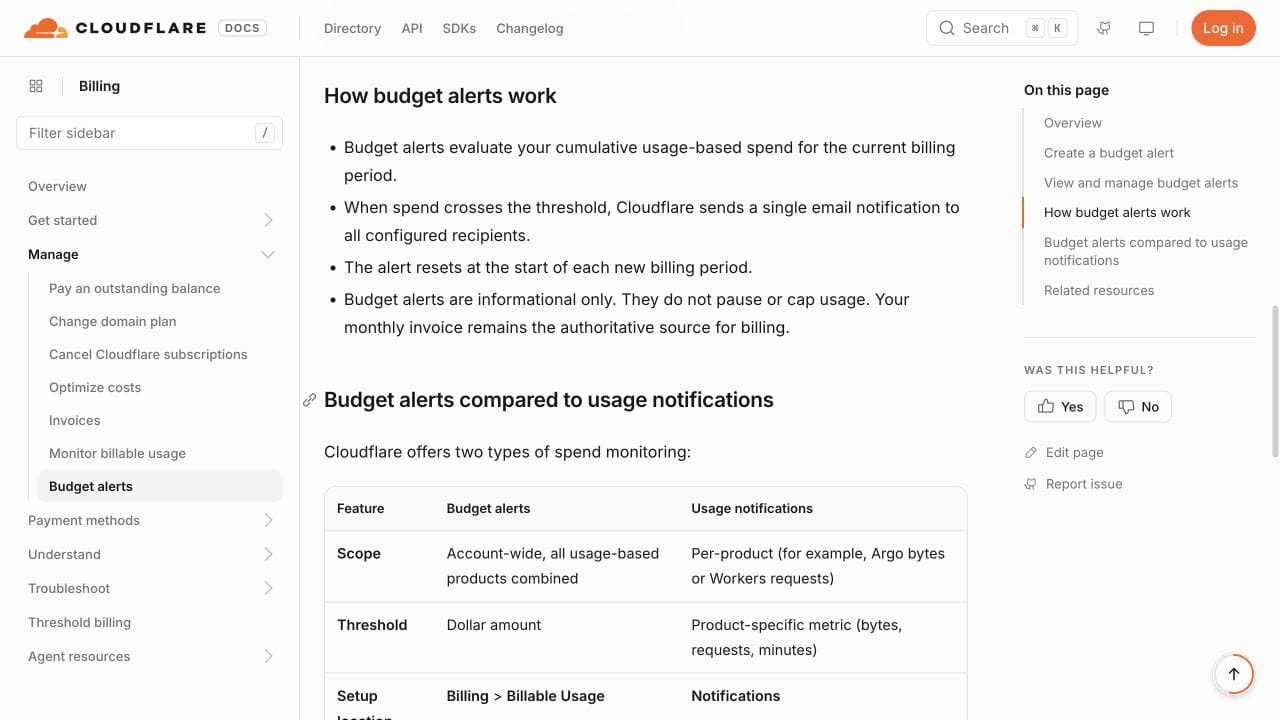
Cloudflare's budget alert documentation, for example, says its alerts notify recipients when cumulative account spending passes a chosen threshold. These alerts are available to accounts paying as they go, not Enterprise contract accounts, and do not stop usage. That distinction is why your response plan needs an action as well as a notification.
Do not assume a provider offers a hard cap, instant reporting or automatic upgrades unless it explicitly confirms that behaviour. If there is no suitable alert, assign manual checks while the campaign is active. Our guide to video hosting allowances and limits covers the terms to confirm before choosing a plan.
Keep a money limit in the provider's actual billing unit
For metered delivery, decide the extra amount you are willing to spend before the spike becomes urgent. Convert that amount using the current rate and any applicable allowance, then leave room for other charges.
As a simple example, Cloudflare Stream's published delivery rate is $1 per 1,000 minutes delivered. An additional 60,000 billable minutes would therefore cost $60 for delivery at that rate, before storage and other applicable charges. This is not 60,000 visitors: watch length, buffering and the provider's billing rules matter. Prices were checked on 6 October 2026.
That example is a way to set a decision point, not a comparison between minutes and gigabytes. Do not carry a minutes threshold across to a bandwidth plan without changing the calculation.
Prepare a fallback before you need it
Your first option might be an approved capacity increase. Confirm the price, when the allowance changes and whether it applies to the current period before relying on it. Write down the expected result so the person making the change knows what to verify.
If you cannot approve more spending, pause promotion you control and consider a temporary page with a useful still image and a short explanation. Keep the page's main purpose available where possible, such as product information or a way to contact you. A blank rectangle is a poor fallback.
Stopping an advert does not stop people sharing the link. Removing one embed also does not guarantee that direct links, other embeds or already open pages stop requesting video. Check the provider's supported controls and verify the result. Avoid deleting the original file as an improvised budget measure.
A browser request check can help you see whether the page still fetches video after a change. The official Chrome Developers tutorial below introduces the Network panel. Its interface is older, so refer to the current Network reference for today's controls. Browser requests are diagnostic evidence, not a replacement for the billing report.
Watch the Chrome Network tutorial on YouTube.
Where Vidreno Hosting fits into the plan
Vidreno Hosting gives you a dedicated video player for your own website or app, with colours you can change to fit your site. It is separate from Vidreno On Demand, which provides public pages for film purchases and rentals.
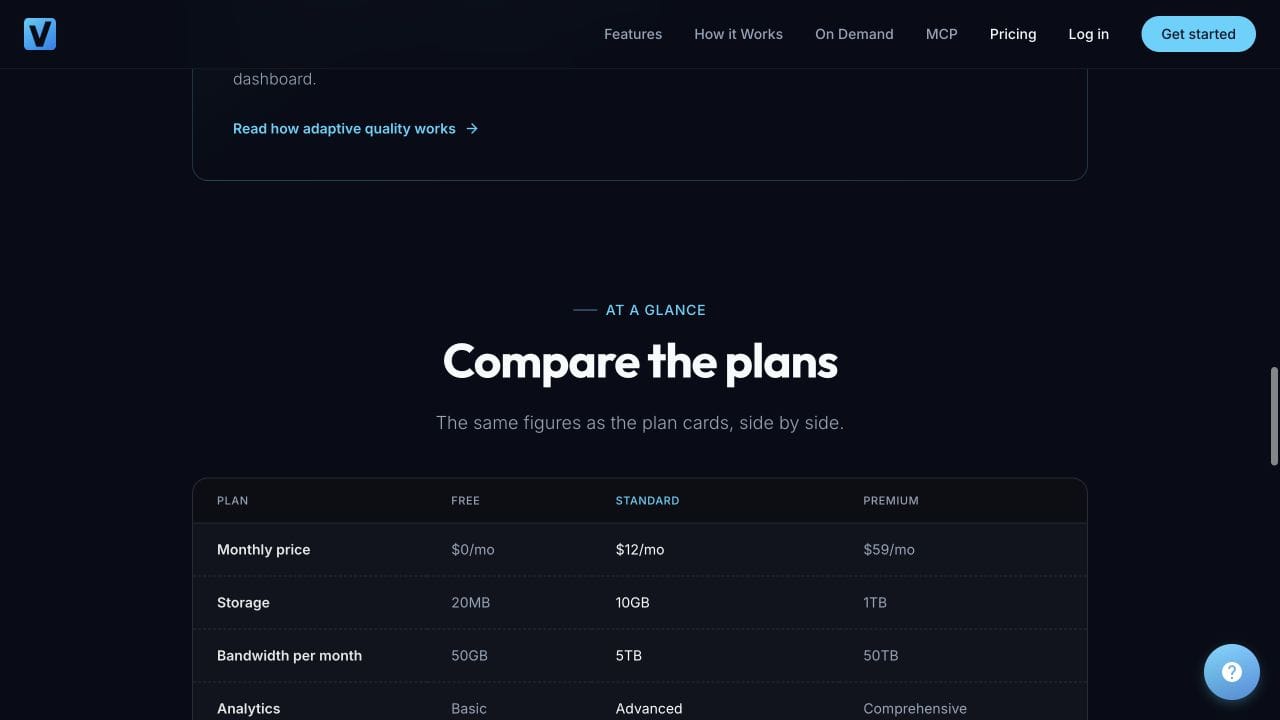
For a small video, the Free plan includes 20MB of storage and 50GB of monthly bandwidth. Standard is $12 a month with 10GB of storage and 5TB of monthly bandwidth. Those published allowances, checked on 6 October 2026, give you concrete numbers to plan around. They are finite allowances, not a promise of unlimited traffic or a confirmed spending cap.
Starting for free lets you check the player on a real page with a small file before committing to a paid plan. If you expect a large campaign, work out the delivery allowance you need first and confirm what happens at its limit. A low starting price is useful when it comes with a plan for the busy days too.
Review the spike before the next campaign
Once traffic settles, compare the final provider usage with your recorded estimates. Note when the rate changed, whether the alert reached the right person and how long the response actually took. Keep the facts separate from guesses about why a video became popular.
Update the next campaign's buffer using what you learned. If approval took a day rather than an hour, that is a response problem worth fixing before changing the video. If your fallback still fetched media, correct and check it before you need it again.
Frequently asked questions
How much extra budget should I keep for a viral video?
There is no reliable universal percentage. Start with recent billable usage, remaining allowance and the time needed to act. Stress the estimate with a faster rate, then choose a reserve you can afford and a response you can carry out.
Can I use the number of views to estimate today's bill?
Views can help explain a surge, but billing may depend on delivered bytes or minutes. Different watch lengths and playback behaviour can make the same view count produce different usage. Use the provider's billing report for the decision.
Will a budget alert stop my video automatically?
Only if the provider explicitly supplies that behaviour. A notification alone does not stop delivery. Confirm any stopping mechanism separately and know what viewers will see when it takes effect.
Does removing the video from my homepage stop all delivery?
Not necessarily. Other pages, direct links and existing sessions may still request it. Check the actual delivery controls and test the relevant routes before assuming spending has stopped.
Should I wait for the monthly allowance to reset?
Only if you have enough room to reach the actual reset time. Check the billing period in your account rather than assuming it resets on the first day of the calendar month. Recalculate if traffic accelerates.
What if my usage report is delayed?
Record the time the report covers, leave additional room for unseen usage and bring the next decision forward. If the remaining budget is small and the delay is unclear, contact the provider and use your agreed fallback rather than treating an old total as current.
Before your next video goes out, give the budget a named owner, a next check time and a practical fallback. Then you can spend more of the busy day welcoming new viewers.