
Quick answer
For a website with a small video library and regular traffic, Vidreno is worth shortlisting for its included bandwidth. Bunny Stream suits people who prefer to pay for usage, while Cloudflare Stream offers a straightforward calculation based on video minutes. All three can support video playback inside your own website or app.
This comparison covers hosting for videos watched inside your website or app. It does not cover public video platforms or film sales and rentals. Vidreno On Demand is a separate service.
If you just want a few videos on your website, you probably don't want a complicated bill to go with them. Start with the space your files need, how much people will watch and the player features you actually use. A low starting price only helps if the total still makes sense once visitors press play.
This guide compares published plans and documentation, checked on 25 September 2026. The recommendations are based on those features and costs, rather than a playback speed benchmark. Dollar figures below are in US dollars; check billing terms and any applicable taxes before buying.
Which affordable video hosting services should you compare?
| Service | Price or charging model | When to consider it | Main tradeoff |
|---|---|---|---|
| Vidreno | Standard: $12 per month, including 10 GB storage and 5 TB monthly bandwidth | A compact library that attracts regular viewing | Storage and bandwidth are separate limits |
| Bunny Stream | Storage from $0.01 per GB and delivery from $0.005 per GB; $1 monthly minimum | Paying for usage instead of a larger fixed allowance | Rates depend on delivery tier, geography and storage configuration |
| Cloudflare Stream | $5 per 1,000 minutes of storage capacity, plus $1 per 1,000 minutes delivered | Estimating costs from video duration and viewing time | More viewing increases the delivery bill |
Sources: Vidreno plans, Bunny Stream pricing and Cloudflare Stream pricing. These are different billing models, not equivalent bundles.
When is Vidreno a good choice for a website?
Vidreno makes most sense when you want to upload a video and copy its embed code, with viewing traffic included in your monthly plan. Its Standard plan lists 10 GB of storage and 5 TB of monthly bandwidth for $12. Premium lists 1 TB of storage and 50 TB of monthly bandwidth for $59. Both include private videos and custom branding.
That balance can suit a business with a handful of product demonstrations, tutorials or portfolio films watched repeatedly. It is less useful to judge the plan by bandwidth alone if your video library is already larger than its storage allowance.
The Free plan includes 20 MB of storage and 50 GB of monthly bandwidth. The storage allowance is small, so use it to try a suitably sized clip and the embedding workflow rather than assuming it will hold a full portfolio. The plan comparison lists the current limits.
Can the video player match your website?
A player is something your visitors will actually use, so its appearance matters too. Vidreno’s player keeps things simple: a clear play button, a slim progress bar and controls that leave the video plenty of room. It looks tidy inside a page, whether you’re showing a product demo or a portfolio film.
You can change the player’s colours to suit your website. That helps the video feel like part of your own design. If you’ve spent time choosing your site’s colours, you shouldn’t have to settle for a player that clashes with them.
Here’s the same Vidreno player used on our homepage. This is a real embed, so you can try the controls for yourself.
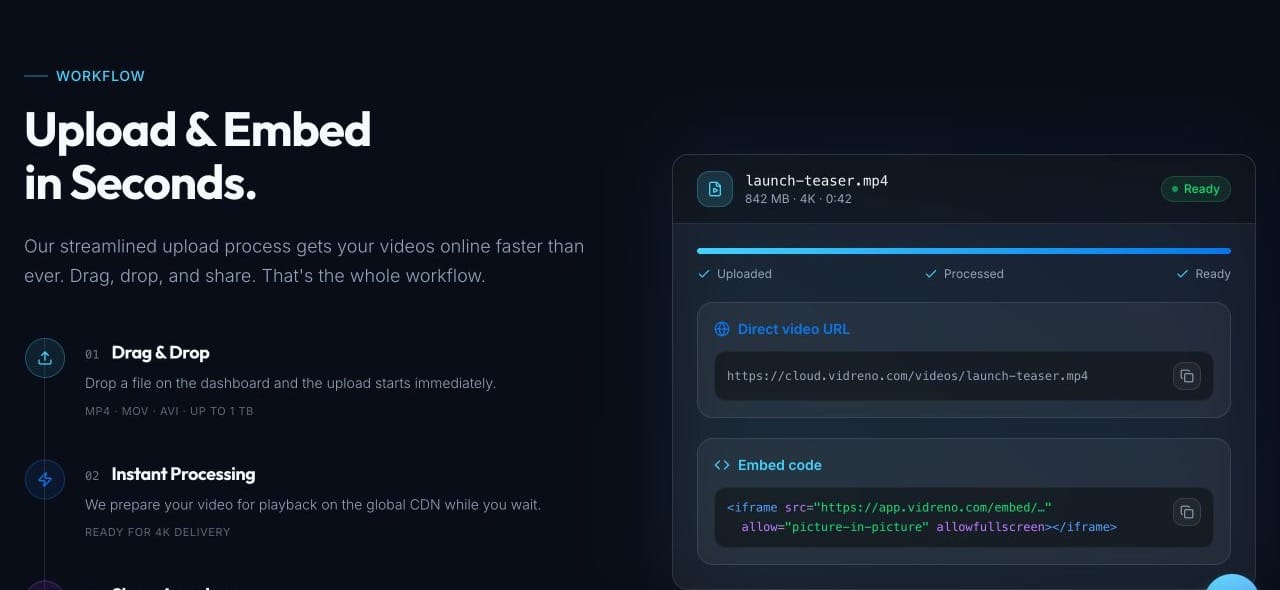
When you add your own video, use the upload and embed workflow and check the player against your page background on both a phone and a laptop. Choose colours with enough contrast to keep the controls easy to see.
When should you choose Bunny Stream instead?
Bunny Stream is worth considering when you would rather pay for the storage and delivery you use. Its advertised starting rates are low, and a player is included. You should still calculate the price using your audience’s locations and the delivery tier you intend to use.
For a quiet website, a usage bill may be smaller than a fixed subscription. For a busy site, repeat the calculation with your expected traffic rather than treating the minimum spend as the likely monthly total. Storage replication can also change the cost. Use the official calculator with your own figures.
Is Vidreno cheaper than Cloudflare Stream?
Vidreno can cost much less than Cloudflare Stream when you deliver a small video library to lots of viewers. You can start hosting for free, then move to a low monthly price with a generous delivery allowance when you need more room.
Cloudflare Stream charges $5 per month for each 1,000 minutes of storage capacity, plus $1 per 1,000 minutes delivered. Vidreno’s Free plan includes 20 MB of storage and 50 GB of monthly bandwidth. Standard gives you 10 GB of storage and 5 TB of monthly bandwidth for $12. You can check our current hosting plans and Cloudflare’s published rates.
Here are two worked examples to make the difference easier to see. They assume the same videos and viewing activity on each service, with no extra delivery from buffering or replays.
| Example | Vidreno | Cloudflare Stream |
|---|---|---|
| One minute video stored at 10 MB, watched in full 1,000 times, transferring 10 MB per viewing | $0 on Free: 10 MB stored and about 10 GB delivered | $6: $5 storage plus $1 for 1,000 delivered minutes |
| 60 minute library stored at 5 GB, with 100,000 views averaging three delivered minutes and 30 MB each | $12 on Standard: 5 GB stored and about 3 TB delivered | $305: $5 storage plus $300 for 300,000 delivered minutes |
In the larger example, Vidreno saves $293 a month, or about 96%. That’s why an included bandwidth allowance can make such a difference when the same videos get watched again and again. You don’t have to pay a separate delivery charge for every additional thousand minutes while you stay within your plan’s allowances.
The Free plan is genuinely useful for a small clip, but its 20 MB storage limit won’t hold a large library. Actual file sizes, viewing quality, buffering and repeat plays affect delivery. These are example savings at published rates, not a promise for every workload. Cloudflare can cost less at low viewing volumes, and negotiated rates may differ.
Want to see what setting up a host involves? This short video from Cloudflare Developers introduces Stream and shows how to upload your first video. It covers Cloudflare, so the screens differ from Vidreno. Use the current pricing documentation above for costs.
How do you compare the real monthly cost?
Start with one realistic month. Record how much video you need to store, how often it will be played and how long people usually watch. Then check what the provider bills for.
- Measure the library. Count stored gigabytes for a storage allowance, or total video minutes for a service that bills by duration.
- Estimate viewing. Ten thousand views averaging three minutes represent 30,000 viewing minutes, not ten thousand complete plays of every video.
- Price the required features. Include the plan needed for branding, privacy, captions or team access.
- Check growth. Ask what happens if traffic doubles or you reach a limit. An upgrade, a usage charge and interrupted playback are very different outcomes.
Here is a hypothetical website with a 5 GB video library and 10,000 monthly views. If each viewing session transfers 30 MB on average, delivery totals about 300 GB using decimal units. Those assumptions fit within Vidreno Standard’s advertised allowances. They do not prove that every site with 10,000 views will fit: larger streams, replays and buffering can change the amount transferred.
For a minute based service, use viewing duration instead. Do not compare 300 GB with 30,000 minutes as though they are interchangeable. One measures transferred data and the other measures time. This is why a universal “cheapest host” claim is rarely useful.
What should you test before moving your videos?
Upload one representative video before moving the whole library. A short talking head clip will not tell you everything about a detailed, fast moving showreel.
- Embed it in the same website template your visitors will use.
- Check playback on a phone and laptop, including fullscreen and captions where available.
- Look for unwanted branding, advertising or distractions.
- Check what a visitor can access when signed out. A hidden page or obscure link is not a substitute for access control.
- Confirm how to replace a video, export your files and monitor usage.
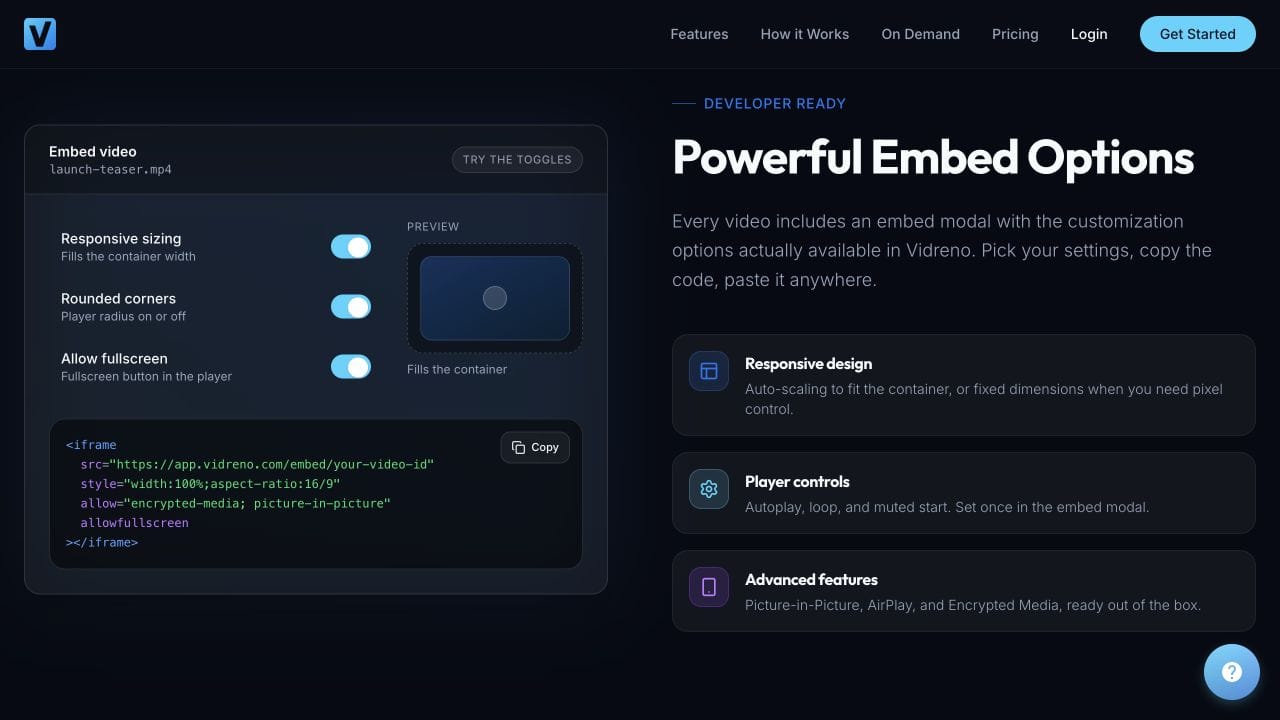
For a closer look at the player controls, explore Vidreno’s hosting features and embed options. Try the sizing and fullscreen options against the space available on your page.
Keep your original files separately. Hosting is part of delivery; it should not be your only copy of work you cannot afford to lose.
Frequently asked questions
What is the most affordable video hosting for a small business?
For a compact library with regular viewing, compare a fixed allowance such as Vidreno Standard with a usage service such as Bunny Stream. If traffic is low, paying for usage may cost less. Price your actual workload before choosing.
Can I try video hosting before paying?
Vidreno has a Free plan with 20 MB of storage and 50 GB of monthly bandwidth. Use a small clip to check the upload and embed workflow on your actual site. A successful test should cover mobile playback, the controls you need and how the player fits your page.
Do visitors need to go to another website to watch?
With an embedded player, visitors can watch on the page where you place it. The hosting service delivers the video in the background. That is the use case covered here: playback within your own website or app, rather than sending people to a public viewing platform.
Is unlimited video hosting really unlimited?
Read the specific limits rather than relying on that phrase. Storage, delivery, file size, account usage and acceptable use conditions can be governed separately. Ask the provider what happens at your expected workload and at a much busier month.
Should I upload videos directly to my website?
You can, but compare the work involved as well as the bill. Your setup must serve the files reliably, provide a suitable player and handle the viewing traffic. A dedicated host may be simpler when you want an upload and embed workflow.
Can I use the same host for my website and app?
Potentially, but check how each will play the video. An iframe can be convenient for a website, while a native mobile app may need a different integration. Test your actual implementation and check the provider’s supported playback methods before choosing a plan.
Which service should you try first?
If your priority is straightforward website embedding with an included bandwidth allowance, compare Vidreno’s plans against your library size. If your traffic is small or unpredictable, also calculate a usage based option. If you are building playback into an app, give the integration requirements equal weight.
Try one video, check the player on your own site and estimate a normal month and a busy one. That gives you a much better decision than choosing the lowest number on a pricing card.
Ready to put your first video on your website? Create your free Vidreno account, upload a small clip and try the player on your own page. You can choose a larger plan when your library needs it.